2.1 FASTQ Format
FASTQ Format
The FASTQ format is a text-based format for storing both a biological sequence (usually nucleotide sequence) and its corresponding quality scores. It is widely used in bioinformatics for storing high-throughput sequencing data. FASTQ files typically have a .fastq or .fq file extension and can be compressed using gzip, resulting in .fastq.gz or .fq.gz files.
This is raw sequencing data that has not yet been processed or analyzed. Other than the sequence there are no indicators yet of where the sequences align to a reference genome or what features they may represent.
A FASTQ file typically consists of multiple records, Each read occupies four lines in the file:
- Sequence Identifier Line: This line starts with the ‘@’ character followed by a sequence identifier and an optional description.
- Sequence Line: This line contains the raw sequence of nucleotides (A, T, C, G, and N for unknown bases).
- Plus Line: This line starts with a ‘+’ character.
- Quality Score Line: This line contains ASCII characters representing the quality scores, and must contain the same number of symbols as letters in the sequence.
An example of a single FASTQ record:
@NB502048:871:H5MCJBGXW:1:11101:10906:1057 1:N:0:TGACCAAT
AAAGCCCACGTGACGATGGGGAAGCCCAGGCGTAGGGAAA
+
AAAAAEEEEEEEEEEEEEEEEEEEEEEEEEEEEEEEEEEE
You may view FASTQ files using command-line tools such as less, zless (for compressed files), or head to see the first few records. For example:
zless sample.fastq.gz | head -n 10 # View the first 10 lines of a compressed FASTQ fileTo count the number of reads in a FASTQ file, you can use the following command:
zcat sample.fastq.gz | wc -l # Count the number of lines in a compressed FASTQ fileSince each read consists of four lines, you can divide the total line count by 4 to get the number of reads:
zcat sample.fastq.gz | wc -l | awk '{print $1/4}' # Get the number of readsTo determine the lenght of the sequences in a FASTQ file, you can use the following command:
zcat sample.fastq.gz | awk 'NR%4==2 {print length($0)}' | sort | uniq -c # Get the lengths of sequences and their countsThis command extracts the sequence lines (every 2nd line starting from line 2), calculates their lengths, sorts them, and counts unique lengths along with their occurrences.
Read Sequence
The sequence line contains the nucleotide sequence of the read. It consists of characters representing the four nucleotides including N (unknown base). The length of the sequence can vary depending on the sequencing technology used.
Quality Scores
The quality scores are estimates of the accuracy of each nucleotide in the sequence. They are represented using PHRED quality scores, which are logarithmically related to the probability of an incorrect base call.
| Phred Quality Score | Probability of incorrect base call | Base call accuracy |
|---|---|---|
| 10 | 1 in 10 | 90% |
| 20 | 1 in 100 | 99% |
| 30 | 1 in 1000 | 99.9% |
Anything above a PHRED score of 30 is generally considered high quality, while scores below 20 may indicate lower quality reads.
The PHRED quality scores are presented with ASCII characters. A Table is included at the end of this section.
[!NOTE] Often bases at the end of reads have lower quality scores, and it is common practice to trim these low-quality bases before downstream analysis. We have noticed that in longer reads, there can so be a series of PolyG bases at the end of the read. This is an artifact of the sequencing process and should be removed during quality control steps.
Naming Conventions for FASTQ Files
The fastq file names are the sample names provided to the sequencing facility when submitting samples for sequencing. It is important to have a clear and consistent naming convention for your FASTQ files to ensure easy identification and organization of your data.
Paired-End vs Single-End FASTQ Files
FASTQ files can represent either single-end or paired-end sequencing data.
In single-end sequencing, each read is sequenced from one end only, resulting in a single FASTQ file per sample.
In paired-end sequencing, each read is sequenced from both ends, resulting in two FASTQ files per sample: one for the forward reads (R1) and one for the reverse reads (R2). The file names often include indicators such as _R1 and _R2 to distinguish between the two files.
A paired-end read can be interpreted by the following schematic:
        READ 1:    -------->
  DNA FRAGMENT: 5' ------------------------------------ 3'
        READ 2:                               <--------
I would recommend this video by Illumina explaining paired-end sequencing.
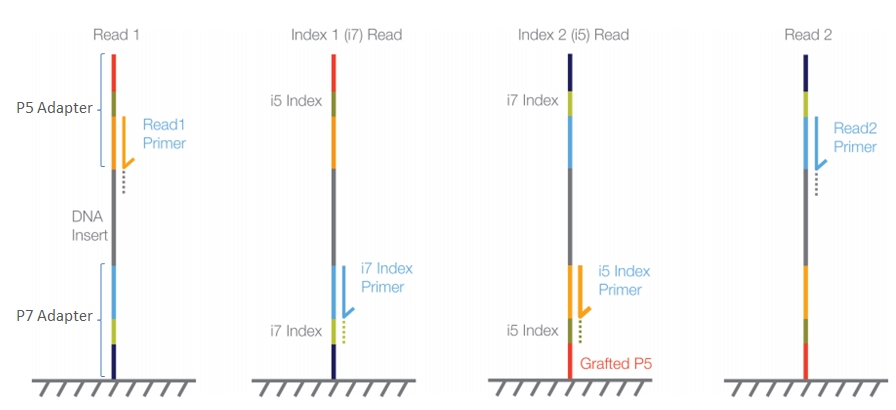
Out of the sequencer
After paired-end sequencing, you may have a total of 8 FASTQ files for a single sample. To combine these into 2 files (_R1 and _R2) you can use the following commands:
nohup cat *L001_R1* *L002_R1* *L003_R1* *L004_R1* > sample_R1.fastq.gz ;
nohup cat *L001_R2* *L002_R2* *L003_R2* *L004_R2* > sample_R2.fastq.gz ;
PHRED Quality Score Encoding
See below for the character:PHRED score mapping:
   0 nul    1 soh    2 stx    3 etx    4 eot    5 enq    6 ack    7 bel
   8 bs     9 ht    10 nl    11 vt    12 np    13 cr    14 so    15 si
  16 dle   17 dc1   18 dc2   19 dc3   20 dc4   21 nak   22 syn   23 etb
  24 can   25 em    26 sub   27 esc   28 fs    29 gs    30 rs    31 us
  32 sp    33  !    34  "    35  #    36  $    37  %    38  &    39  '
  40  (    41  )    42  *    43  +    44  ,    45  -    46  .    47  /
  48  0    49  1    50  2    51  3    52  4    53  5    54  6    55  7
  56  8    57  9    58  :    59  ;    60  <    61  =    62  >    63  ?
  64  @    65  A    66  B    67  C    68  D    69  E    70  F    71  G
  72  H    73  I    74  J    75  K    76  L    77  M    78  N    79  O
  80  P    81  Q    82  R    83  S    84  T    85  U    86  V    87  W
  88  X    89  Y    90  Z    91  [    92  \    93  ]    94  ^    95  _
  96  `    97  a    98  b    99  c   100  d   101  e   102  f   103  g
 104  h   105  i   106  j   107  k   108  l   109  m   110  n   111  o
 112  p   113  q   114  r   115  s   116  t   117  u   118  v   119  w
 120  x   121  y   122  z   123  {   124  |   125  }   126  ~   127 del