2.2 SAM/BAM Format
SAM (Sequence Alignment Map) and BAM (Binary Alignment Map) are the standard formats for storing aligned sequencing reads. BAM is the compressed binary version of SAM.
Overview
After aligning sequencing reads to a reference genome, the output is typically a SAM or BAM file containing:
- Read sequences
- Quality scores
- Alignment positions
- Mapping quality
- Alignment flags
- Optional tags with additional information
SAM Format Structure
SAM files are tab-delimited text files with two sections:
1. Header Section (Optional)
Lines starting with @:
@HD VN:1.6  SO:coordinate
@SQ SN:chr1 LN:248956422
@SQ SN:chr2 LN:242193529
@PG ID:bwa  PN:bwa  VN:0.7.17
Header tags: - @HD - Header line (version, sort order) - @SQ - Reference sequence dictionary - @PG - Program information - @RG - Read group information
2. Alignment Section
Each line represents one alignment:
READ1 99 chr1 10000 60 75M = 10200 275 ACGTACGTACGT... IIIIIIIIII... NM:i:0 MD:Z:75 AS:i:75SAM Fields
| Col | Field | Description |
|---|---|---|
| 1 | QNAME | Query (read) name |
| 2 | FLAG | Bitwise flag (alignment properties) |
| 3 | RNAME | Reference sequence name (chromosome) |
| 4 | POS | 1-based leftmost mapping position |
| 5 | MAPQ | Mapping quality (0-255) |
| 6 | CIGAR | CIGAR string (alignment representation) |
| 7 | RNEXT | Reference name of mate/next read |
| 8 | PNEXT | Position of mate/next read |
| 9 | TLEN | Template length (insert size) |
| 10 | SEQ | Read sequence |
| 11 | QUAL | Base quality scores (ASCII) |
| 12+ | TAGs | Optional fields (e.g., NM, MD, AS) |
Understanding SAM Flags
The FLAG field is a bitwise flag indicating alignment properties:
Common flags:
0- Read mapped, no special properties4- Read unmapped16- Read reverse strand83- First in pair, mate reverse strand, proper pair99- First in pair, mate reverse strand, proper pair (read forward)147- Second in pair, read reverse strand, proper pair163- Second in pair, mate reverse strand, proper pair (read forward)
Common Flag Combinations
# Check if read is unmapped
samtools view -f 4 file.bam

# Check if read is mapped
samtools view -F 4 file.bam

# Get properly paired reads
samtools view -f 2 file.bam

# Get reads on reverse strand
samtools view -f 16 file.bam
Decode flags online: Explain SAM Flags
Viewing SAM Files
You can view sam files using samtools tview -p which provides a text-based alignment viewer:
samtools tview -p chr11:32224569-32251632 EB_CD71_E14_WT_Med1_ChIP.bam 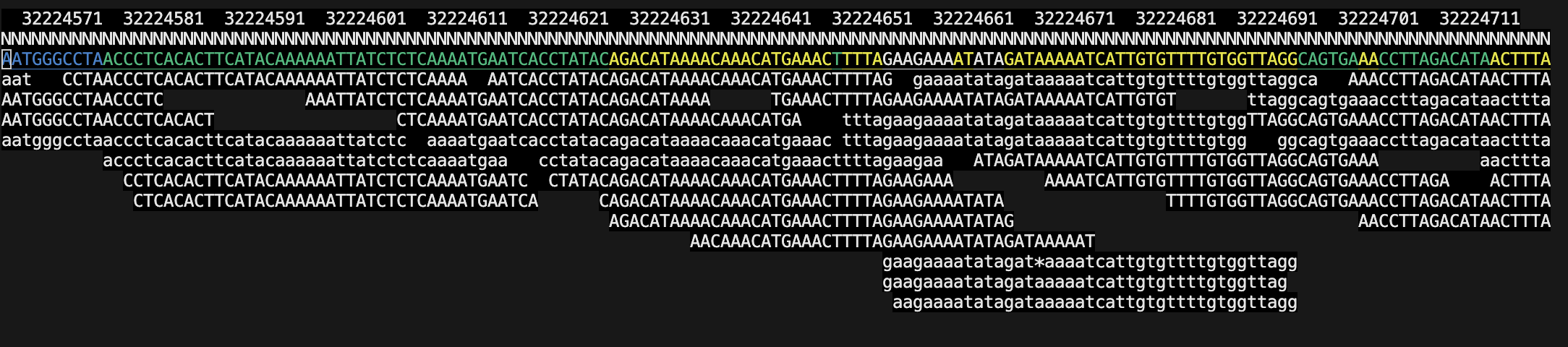
You can also use the reference genome fasta file for better visualization of mismatches:
samtools tview -p chr11:32224569-32251632 EB_CD71_E14_WT_Med1_ChIP.bam -f /databank/igenomes/Mus_musculus/UCSC/mm39/Sequence/WholeGenomeFasta/genome.fasta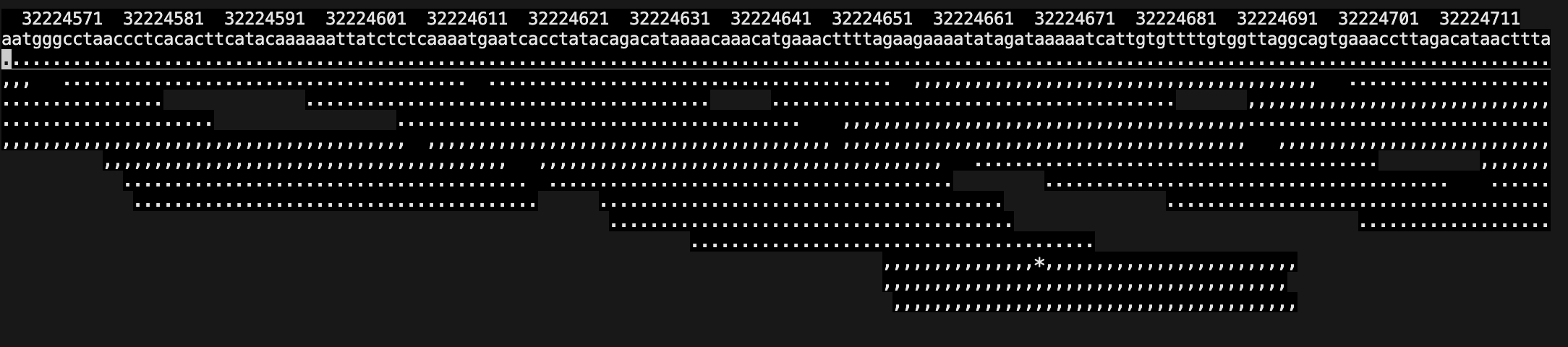
If you want to exit tview, just press q.
If you are looking for variants the tview is a great way to visualize them quickly.
Viewing BAM Files in IGV
IGV (Integrative Genomics Viewer) is a popular tool for visualizing BAM files: See the IGV User Guide for instructions on loading BAM files and navigating the genome.
CIGAR String
CIGAR describes how the read aligns to the reference:
Operations:
M- Match or mismatchI- Insertion (gap in reference)D- Deletion (gap in read)S- Soft clipping (clipped but sequence present)H- Hard clipping (clipped and sequence removed)N- Skipped region (for RNA-seq splicing)=- Sequence matchX- Sequence mismatch
Example CIGAR strings:
75M- 75 bases match/mismatch50M1I24M- 50 match, 1 insertion, 24 match40M5D35M- 40 match, 5 deletion, 35 match10S65M- 10 soft-clipped, 65 match25M100N50M- 25 match, 100 skipped (intron), 50 match (RNA-seq)
BAM Format
BAM is the compressed binary version of SAM:
Advantages:
- ~4x smaller file size
- Faster to process
- Supports indexing for rapid region queries
Disadvantages:
- Not human-readable
- Requires tools to view
Working with SAM/BAM Files
View BAM as SAM
samtools view file.bam | headView BAM with header
samtools view -h file.bam | headConvert SAM to BAM
samtools view -b input.sam -o output.bamConvert BAM to SAM
samtools view -h input.bam -o output.samSort BAM by coordinate
samtools sort input.bam -o sorted.bamIndex BAM file
samtools index sorted.bam
# Creates sorted.bam.bai
Extract specific region
# Requires indexed BAM
samtools view sorted.bam chr1:10000-20000
Filter alignments
# Only mapped reads
samtools view -F 4 -b input.bam -o mapped.bam

# Only properly paired reads
samtools view -f 2 -b input.bam -o proper_pairs.bam

# Minimum mapping quality 30
samtools view -q 30 -b input.bam -o high_quality.bam
Count reads
# Total reads
samtools view -c file.bam

# Mapped reads
samtools view -c -F 4 file.bam

# Unmapped reads
samtools view -c -f 4 file.bam
BAM File Statistics
Basic stats with samtools
samtools flagstat file.bamOutput includes:
- Total reads
- Mapped reads
- Properly paired reads
- Singletons
- Duplicates
Detailed stats
samtools stats file.bam > stats.txtBest Practices
- Always sort and filter BAM files before indexing or downstream analysis
- Index sorted BAM files (.bam.bai) for efficient access
- Delete the SAM and only keep BAM (and .bam.bai) format for storage (smaller, faster)
File Size Comparison
For a typical experiment:
- FASTQ: 10 GB
- SAM: 15 GB
- BAM (unsorted): 4 GB
- BAM (sorted): 3 GB